






Playbook
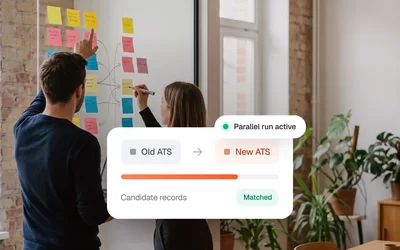
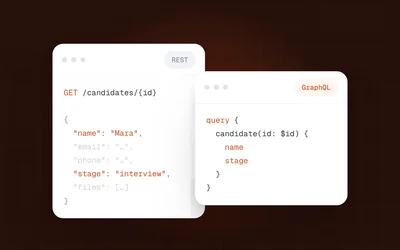
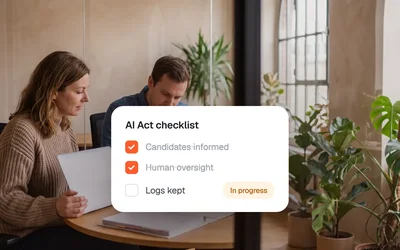
ATS Migration Without Data Loss
One connection on your side reaches 75+ ATS and 1,500+ job boards. Kini builds each integration, monitors it and fixes what breaks.




Whether you build an ATS, run an agency or operate a job board, the same three problems keep coming back.
Your customers keep asking for integrations you don't have yet. Each one needs engineers most teams can't spare, and every later change costs time again.
One ATS has a modern API, the next only exports XML, a niche job board sends applications by email. A unified API only covers the ones that speak REST.
A field gets renamed or a token expires, and applications stop arriving. Nobody notices until a customer opens their account to zero jobs.

Managed recruiting connectivity is an integration layer between ATS systems, recruiting agencies, and job boards. Unlike a unified API, it does not require the source system to speak REST: Kini adapts to whatever each system offers, while the partner keeps a single connection. It includes monitoring, recovery, and per-record sync status.
One loop: jobs come out of the ATS, go out through Kini Shop to the job boards, and applications come back in.
Kini Core connects your systems and keeps every connection running. Kini Shop takes your jobs out to the platforms that matter.
Kini Core connects 75+ ATS and the job boards behind them through one managed layer. Monitoring, recovery and maintenance stay with us, not with your team.

Kini Shop takes jobs straight from the connected ATS to the boards you choose, from 1,500+ including the Bundesagentur für Arbeit and Kleinanzeigen, white-label on your own domain.
Kini Shop usually builds on Kini Core. Use them together, or either one on its own. Here is what each one brings.
API, feeds, email, crawler or custom. The list stays open.
Your side stays one connection, with one API key per partner.
Choose from 1,500+ job boards and promote a single job with one click.
Run several jobs as a campaign on the platforms that matter.
If a source delivers empty or wrong data, Kini does not pass it on.
Retries first, then a replacement path. If that fails too, our team takes over.
Jobs come straight out of the connected ATS. No re-entering.
The shop runs under your brand, on your own custom domain.
Kini maps, cleans and checks each record in the background.
One operator account for all your end customers, white-label on your own domain.
Publish to the Bundesagentur für Arbeit and Kleinanzeigen alongside classic job boards.
If your customer already has contracts with boards, Kini publishes through them.
Underneath both: built in Europe, GDPR-first. The same data protection applies to Kini Core and Kini Shop.
180days
Kini deletes or anonymizes personal applicant data 180 days after an application is created. Data in your customer's ATS follows their own retention rules.
Each end customer's credentials are stored securely in Kini. With a Magic Link, customers enter them directly.
A DPA (AVV) is available on request through our sales team.
No engineering backlog. No manual data handling. Just a working connection between your tools.













Ship the integrations your customers ask for, without owning the maintenance. Kini connects once to your ATS and keeps every integration running.
The questions we hear in almost every first call. Each answer comes with the part of Kini that does the work.
Yes, any system, however it's reached: API, feeds, email or crawler. With no interface at all, Kini AI does the adapting.
Live in minutes once we have the credentials. Your customer gets a Magic Link with a guide, and if they get stuck, we join the call.
Choose from 1,500+ job boards. Promote a single job with one click, or run several jobs as a campaign on the platforms that matter.
Yes, straight back into the right ATS. Kini sends each application to the ATS the job came from, with a sync status per record.
Broken data stays out. Retries run first, then a replacement path. If that doesn't solve it, our team takes over.
Yes, white-label on your own domain. All your customers in one workspace: credentials, mappings and sync status for each end customer.
Behind every answer is one connection on your side. Kini runs everything behind it.

Try Add system. Every new ATS joins the list, your side keeps one connection.
Mertens Pflege goes from invite to live. Need help brings in the Kini team.
Switch between a job ad and a campaign, then watch it go live on the boards.
New applications arrive and sync into the ATS. Click one to see its route.
An empty job list stops at Kini. Live jobs stay untouched while recovery runs.
Pick a brand color. Logo and domain change, every end customer stays live.
From go-live on, every step below runs on Kini's side, for every connection and every end customer. Your team never has to watch a sync or repair an integration again.
Unusual sync volumes and failed syncs get flagged while they happen. Kini watches every connection of every end customer, so nobody on your team has to keep an eye on sync logs.
Empty or wrong data from a source is not passed on. The jobs your customers already see stay live while Kini looks into the source.
Failed deliveries are retried with backoff. Kini spaces out the attempts, so a short outage on the other side is handled without anyone on your team stepping in.
If the primary path fails for good, Kini delivers over a replacement path. Every application carries its own sync status, so you can always see how it got there.
Escalation to a person is part of the service, not an exception to it. If the automatic steps can't solve a problem, the Kini team takes over and works it out with the source.
Partners get status updates by webhook and can show them in their own product. End customers see them by email and in the dashboard.
Note: notification emails come from Kini, not from your brand.

Kini connects your ATS to the channels and agencies your customers already use, and keeps those connections running.
Kini connects once to your ATS, however it can be reached. Your customers see one integration inside your product.

Clients often run different ATS. Kini keeps them apart and connected at the same time, so candidates reach the right system.
Credentials, mappings and sync status for each of your end customers sit in one place, white‑label on your own domain.

Receive jobs from the ATS your employers already use, and send applications back into the systems they came from.
Behind it, Kini reaches 75+ ATS, however each is reached. New, changed and closed jobs come through as they happen.

For companies with their own recruiting team. Book the boards in Kini Shop, and applications go back into your ATS.
Kini Shop sits right next to it. Kini reads each job once and publishes it on the boards you book.
A different setup or a special request? Tell us which systems you want to connect, and we'll show you how Kini fits.
API, feeds, email, crawler or custom. The list stays open, and when a system needs a new path, we add one.







The product hub, the resource library, every integration we connect to, the full FAQ and the docs maintained by the team. Five places that might hold the answers you are searching for.
Sync engine, mapping logic, error handling. Each page shows the data flow with concrete examples.
What teams ask before, during and after connecting to Kini: setup, integrations, mapping, pricing and support.
Playbooks, technical guides, news and events from the Kini team, updated and kept honest.
Each integration page lists setup time, the fields synced, known limits and the team's recommended config.

Topics: getting started, integrations, data sync, migration, pricing. Migration questions get asked the most.

Setup walkthroughs, API reference, webhook payloads and integration guides. Updated with every product release.